I’ve been working my way toward the CCNA, and I keep a little roadmap repo called LearnNetworking to keep myself honest. One of the ideas on that list was to build my own study tools instead of just consuming other people’s. Tonight that idea turned into RapidCCNA, a Godot study game for the CCNA 200-301 exam, and it grew a lot faster than I expected. I merged fourteen pull requests between late afternoon and midnight, and the project went through nine milestones, M0 through M8. Here’s roughly how that went.
The core loop
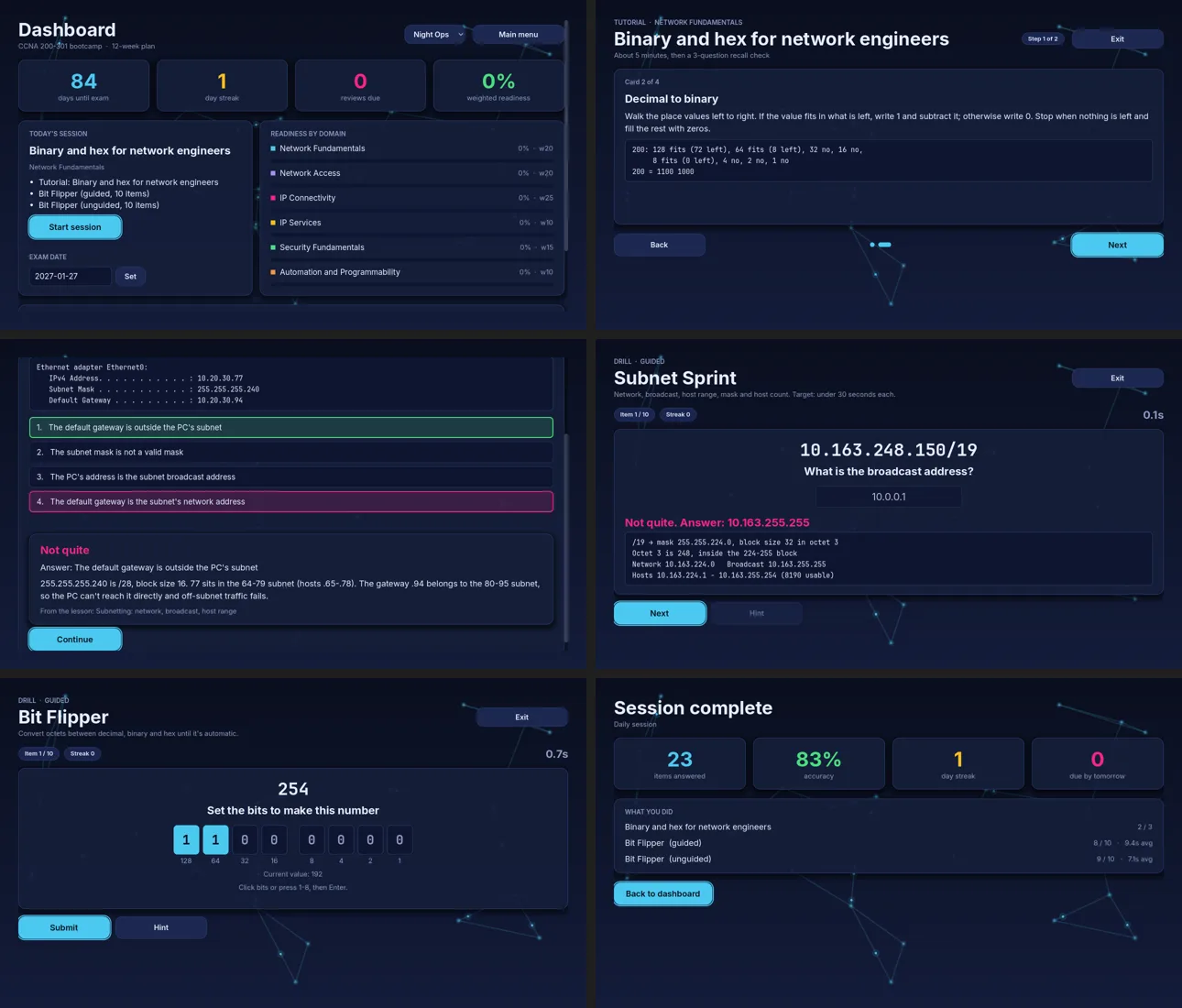
The first PR was the big one. It set up the Godot project, the save system, a content pipeline that validates every lesson and question, and a test suite. It also gave the game four switchable color schemes, which I call looks, with an animated network drifting in the background. Night Ops, the dark blue one, won as the default.
On top of that sits the loop every unit follows: a short tutorial, a guided drill with hints and worked solutions, an unguided drill once you’ve had some practice, and then spaced repetition to bring things back right before you’d forget them. The first two drills were Subnet Sprint and Bit Flipper, which are exactly as subnet-y and bit-y as they sound. By the end of that PR there was also a small networking engine that understands IP addresses, routing tables, ACLs and NAT, and a simulated Cisco command line for hands-on labs.
That command line ended up being the heart of the whole project. It isn’t a real
router, but it knows the CCNA slice of Cisco IOS well enough to accept abbreviations
like sh ip int br, throw the same cranky error messages, and tell you whether your
configuration actually works. Labs are graded on how the simulated network behaves,
not on whether you typed the exact commands I had in mind.
A follow-up PR added a Topics screen, because the daily plan marches through the exam areas in order and sometimes you just want to go practice OSPF.
Filling in the blueprint
The CCNA blueprint breaks the exam into six areas and 53 subtopics. Milestones M4 and M5 were about covering all of them.
M4 added puzzles for the switching and routing topics that trip people up the most: spanning tree, OSPF, EtherChannel and MAC address tables. Each puzzle runs on its own little logic engine, and the labs use the exact same engines, so a drill and a lab can never disagree about who wins a root bridge election.
M5 came in three parts and was mostly content. It brought the game to 42 lessons that cover every one of the 53 subtopics, along with new drills for IPv6, cabling, Wi-Fi channels, HSRP, network services and JSON. The simulator picked up a bunch of new tricks too, like DHCP, SSH, HSRP failover and neighbor discovery.
Writing all those labs turned up some fun bugs. My favorite was that the DHCP server
kept handing out addresses it was explicitly told not to. It turned out the version of
Godot I was on quietly cut numbers down to 32 bits inside range(), and IP addresses
above 127.255.255.255 don’t fit in that. Another one: if you renamed a router with hostname, half the network commands stopped working, because they were looking the
device up by its old name.
A real mock exam
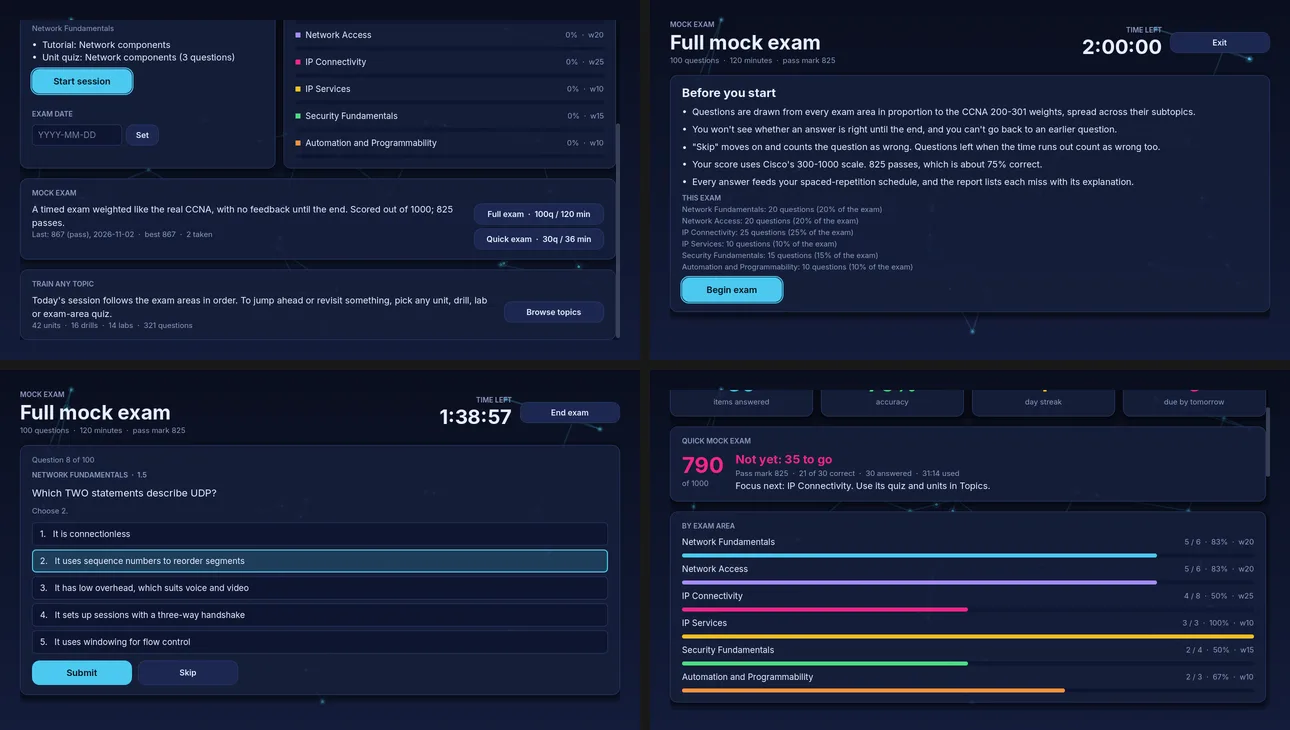
M6 added a timed mock exam, which is the part I’m most excited to actually use. You can take a full one (100 questions in two hours) or a quick one (30 questions), and the questions are split across the six areas by the same weights the real exam uses. There’s a countdown, no feedback until the end, and no going back. Scores land on Cisco’s 300 to 1000 scale with 825 to pass. Cisco doesn’t publish how it scales scores, so that part is my best approximation, and the README says so.
To keep the exam from repeating itself, the question bank had to grow a lot. It went
from 221 questions to 600 over two PRs, split exactly by exam weight, plus nine
command-line tasks where you configure something real inside a question. Testing those
caught a sneaky one: transport input ssh telnet was being read as just ssh, so a
config that left Telnet wide open was passing the “SSH only” checks.
The longest answer is usually right
This was my favorite finding of the night. While doing a quality pass on the question bank, I checked how often the noticeably longest answer choice was the correct one. It was 58% of the time, when it should be closer to 25%. In other words, you could game my mock exam by always picking the wordiest option, which is exactly the kind of habit that falls apart on the real thing.
So I rewrote the wrong answers on 228 questions to be just as specific as the right ones, and that number dropped to 36%. There’s now a QA script in CI that fails the build if it creeps back over 40%, along with checks for things like duplicate choices, explanations that are too short to teach anything, and questions that mention an exhibit that isn’t there.
Making it usable for more people
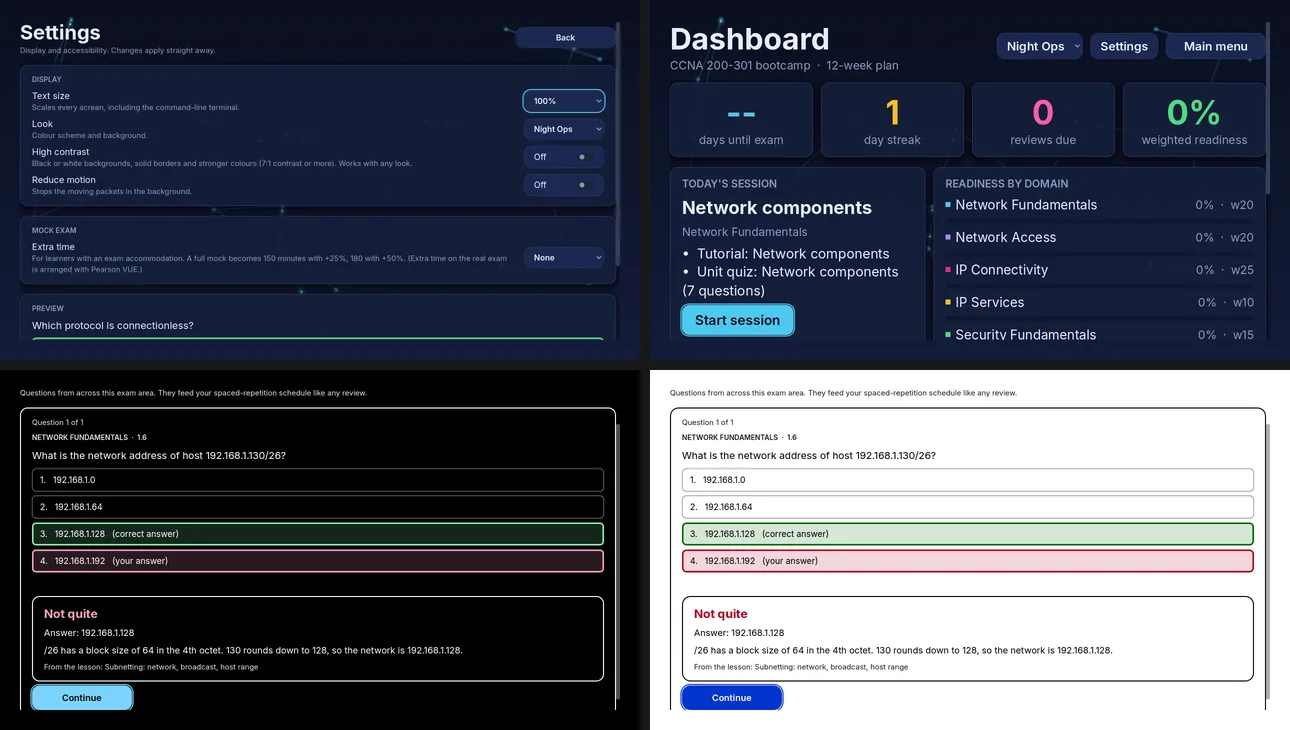
M7 was accessibility and the web build. There’s a settings screen now with text size, a high contrast mode, reduced motion, and extra time on the mock exam for anyone with an accommodation. I also fixed a handful of text colors that didn’t have enough contrast, and answers now say “(correct answer)” and “(your answer)” in words instead of relying only on red and green.
The web build needed some love too. The whole UI was designed at 1280×720 and simply shrunk to fit, which meant text on a sideways phone came out around 8 pixels tall. Now smaller screens get a smaller canvas instead, so the text stays readable. The build runs in a browser, saves your progress, and gets built automatically on every push.
M8 started with an engine upgrade to Godot 4.7, mostly so I could add screen reader
support. That came with its own adventure. My test framework silently hung on the new
engine instead of failing, and then Godot 4.7.0 crashed the moment you answered a
question with a screen reader running on Linux. Godot 4.7.2 had the fix, so that’s
what the project uses now. Every button got a proper name, so a screen reader hears
“Network components: Study unit” instead of a dozen buttons that all say “Study,” and
results and terminal output are read out as they happen. Along the way I cleaned the
project down to zero editor warnings and taught the simulator | include style output
filters, which I’d been missing since M3.
The last bit of polish
The final two PRs were small quality-of-life things. Acronyms in lessons are now highlighted and show their full name when you hover over them, and CI fails if a lesson uses an acronym the glossary doesn’t explain. There’s also a Study button under every question that pops open the full lesson without losing your place.
That Study button, of course, did nothing at first. It was opening a panel that was zero pixels wide. At the same time, a lot of screens were opening scrolled all the way to the bottom, because the page tried to follow keyboard focus to whatever button was selected first. Both are fixed, and there’s now a layout test that opens every screen, question, lesson and lab at two window sizes and fails if anything runs off the edge.
Where it stands
By midnight RapidCCNA had 42 lessons, 600 questions, 16 drills, 14 labs and a full mock exam, all backed by 244 passing tests. There are still some gaps. I haven’t tried typing answers on a real phone keyboard yet, and I haven’t tested with screen readers on Windows or macOS. But it already does the thing I wanted when I started, which is give me somewhere to practice that actually checks whether I understand what I’m doing. Next up is actually studying with it.